
Prerequisites:
- The Managed Device agent has to be installed.
- The communication between the agent and the AS and DS is working.
- The plugins have to be downloaded (RayVentory FTP)
Activating the Plugin
- Copy the plugins to the system that has the agent installed.
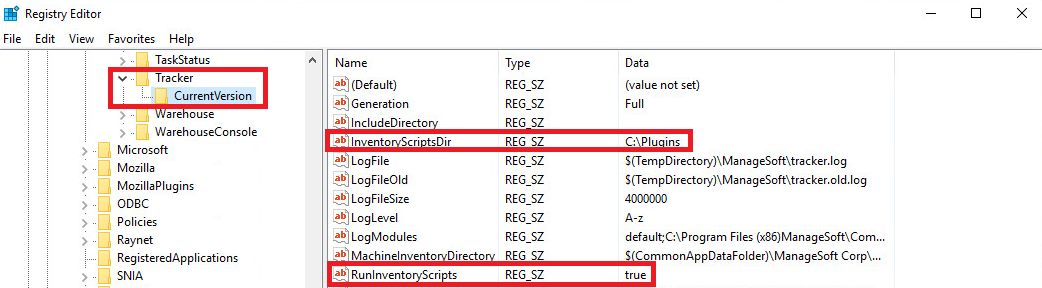
- Add the following registry keys to "HKLM\SOFTWARE\ManageSoft Corp\ManageSoft\Tracker\CurrentVersion" for x64 or "HKLM\SOFTWARE\Wow6432Node\ManageSoft Corp\ManageSoft\Tracker\CurrentVersion" for x86:
- InventoryScriptsDir = [Path to the plugins-folder]
- RunInventoryScripts = "true"
Verify that the Activation has been Successful
- Open a CMD (Run as Administrator).
- Run the following command: "C:\Program Files (x86)\ManageSoft\Schedule Agent\ndschedag.exe" -t machine.
- Right-click the generate inventory event and choose it run option.
- Check the tracker log file (C:\Windows\Temp\ManageSoft\tracker.log) for logging entries of the plugin.
Comments
0 comments
Please sign in to leave a comment.